 WebFV
Choose by the file and where it can be analyzed
To reverse engineer software with AI, first decide what evidence you need and where the analysis may run. REA connects a coding agent to local inspection tools. RevEng.AI provides a remote analysis platform with an MCP endpoint. They are separate products; a configuration for one will not connect you to the other.
Choose REA when you want to inspect local files and manage the required tools yourself. Consider RevEng.AI when your workflow already uses its platform and you have permission to use the relevant analysis there. In either case, ask for evidence behind the explanation. A convincing summary cannot establish that the original source code has been recovered.
This guide covers these two routes for software you own or are authorized to inspect. It is a selection guide, not a ranking or a replacement for the existing REA installation guide.
Match the input before choosing an engine
| Decision | REA local route | RevEng.AI platform route |
|---|---|---|
| Starting material | Local target files or a supported application artifact | A binary analysis available in the platform |
| Connection | Local CLI or MCP server | Authenticated HTTP MCP |
| Dependencies to check | Runtime plus the engine needed for your target | Client compatibility, account access and analysis availability |
| Evidence to keep | Target identity, engine output and source locations | Analysis and function IDs, disassembly and returned results |
| Cost decision | Agent/model service and any separately licensed engine | Account terms and credit-consuming operations |
The REA README lists requirements by target. For static JavaScript or Electron inspection, you do not need a native decompiler merely to inspect modules, imports or IPC relationships. Native pseudocode analysis uses an engine such as Hopper, Ghidra or IDA. Android APK decompilation has its own JADX and JDK requirements. These are different workflows, not interchangeable checkboxes on an installer.
The current REA runtime requirement is Node 22.x at least 22.19, Node 24.x at least 24.11, or Node 26+, plus npm. Our existing setup guide is pinned to REA 6.7.0. Check the target's requirements before installing a new engine: a missing engine for a task you are not attempting is not a reason to install everything.
Follow the data as well as the process
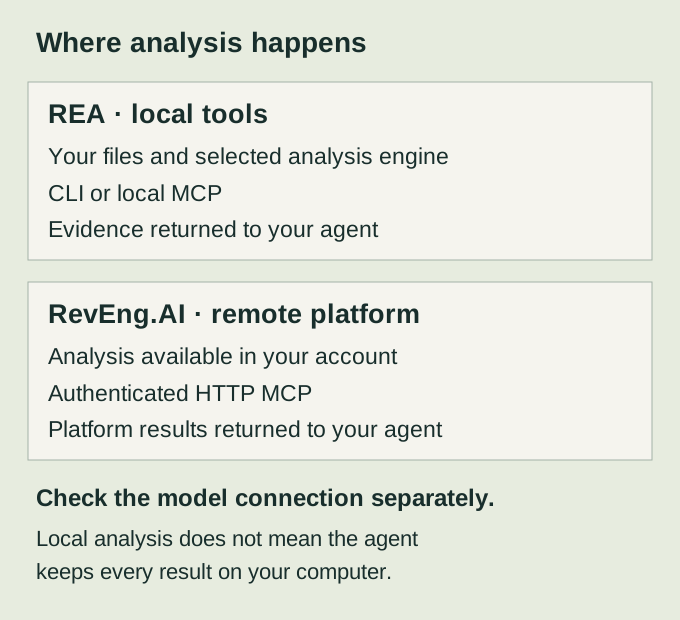
REA's analysis tools run locally, according to its official documentation. Your coding agent can still send the returned material to its configured model service. A local MCP process therefore does not establish a fully offline AI workflow. Check both the analysis tool and the model connection before using confidential files.
For the remote route, decide whether the sample may be made available to that service before creating an analysis. Check your organization's rules and the platform's current account terms. A file being yours does not necessarily mean it contains no customer data, embedded credentials or licensed components.
Keep the first sample small. Save its file hash, platform and architecture alongside your question. If two reports refer to different builds, comparing their function names alone can send you down the wrong path.
Connect RevEng.AI without confusing it with REA
RevEng.AI's MCP documentation specifies https://api.reveng.ai/mcp/ with Bearer authentication using an API key or signed JWT. The following is a sanitized Claude Code configuration shape; it is not a working credential:
{
  "mcpServers": {
    "reveng-platform": {
      "type": "http",
      "url": "https://api.reveng.ai/mcp/",
      "headers": { "Authorization": "Bearer SAMPLE_NOT_A_REAL_TOKEN" }
    }
  }
}
Use the documented configuration for your own client. VS Code native MCP uses servers at the top level; Cline's documented transport value is streamableHttp. Do not fix a client-schema problem by putting HTTP settings into REA's local command entry. You can inspect a sanitized example in the MCP configuration checker, which does not connect or authenticate.
A connected server establishes transport access. It does not prove that a particular analysis is available or that decompilation has finished. Keep those checks separate.
Check costs before asking for fresh results
RevEng.AI documents start_ai_decompilation and decompile_and_wait as credit-charging operations that discard an existing result. Read the current account terms before requesting them. This guide does not quote a per-function price or promise unlimited free analysis. The endpoint and billing descriptions here come from documentation; WebFV has not run authenticated RevEng.AI analysis for this comparison.
REA is MIT-licensed, but the overall workflow can still involve a paid agent service or separately licensed analysis engine. Choose the engine and model you already have access to where they fit the task. A free connector is not a statement about every service it connects.
Verify one claim against a sample you understand
For a first comparison, use a tiny program you wrote and retain its source as the answer key. For example, make a function that returns a fixed label for one integer input and a different label otherwise. Compile it yourself if testing a binary workflow; use the script directly if testing JavaScript inspection.
Ask the agent to identify that function, describe its two branches, and point to the instructions or source locations supporting the description. This is a proposed test, not a result we claim either product achieved.
Check the answer in this order:
- Confirm the report refers to the same file and build. Record its hash.
- Locate the cited function or source range. Check that the location exists.
- Compare the reported condition and both return values with your retained source.
- Separate observed names and constants from names the model inferred.
- Record what remains unproven, such as behavior that depends on a library or runtime input.
A correct explanation of this small example gives you a bounded result. It does not prove that a larger optimized binary will yield its original source, comments or variable names. Increase complexity one step at a time so a wrong answer is still easy to diagnose.
Continue with the problem you actually have
For the local route, use REA setup and then REA doctor to distinguish registration from engine readiness. If tools connect but a model gateway rejects their schemas, follow REA schema errors.
For the platform route, use the official RevEng.AI developer documentation to check account access and analysis operations before sending your sample. Keep a copy of the evidence with any conclusion you plan to reuse.