 WebFV
Find the current SolidCraft project
The open-source parametric CAD project is tangency-labs/solidcraft on GitHub. Its README links solidcraft.io and docs.solidcraft.io. The former bherbruck/solidcraft repository address redirected to this project when checked. Do not choose a download solely because another site uses the SolidCraft name.
This guide uses SolidCraft 0.20.0, released October 23, 2026. We downloaded the official macOS universal CLI archive, matched its SHA-256 to the release asset's published digest, and tested a small original model in a temporary directory. We created a native design, exported STEP, reopened both and rendered the result. Desktop UI, Windows/Linux packages and the browser editor were not tested here.
Choose a download or a source checkout
The 0.20.0 release separates application packages from source archives:
| Your task | Official release option |
|---|---|
| Windows desktop | Match the executable, MSI or portable ZIP to x64, x86 or arm64 as listed |
| macOS desktop | Universal DMG for Apple Silicon and Intel; upstream lists macOS 11 or later |
| macOS command line | solidcraft-cli-0.20.0-macos-universal.zip |
| Linux desktop | Match the distribution format and x86_64/aarch64 architecture; release notes list glibc 2.35 or later |
| Browser trial | Follow the repository's browser app link |
| Read or build the source | Use the repository or the source archive for the intended tag |
GitHub's automatic Source code download is not a desktop installer. A .solidcraft file is a model document, not the application. Keep these separate when troubleshooting a download that will not open.
The project describes its code as MIT OR Apache-2.0, at your option; third-party components and assets retain their own notices. It is an independent CAD application, not an Autodesk product. Release notes also say the desktop packages are not signed yet. Check the source and checksum before deciding whether to run a package; this guide's CLI test does not certify every installer.
Create a first model with a measurable result
Use a new folder for this exercise. Extract the CLI package and run its executable from that folder, or substitute its full path for solidcraft-cli below. Check the version first:
solidcraft-cli --version
The tested executable printed solidcraft-cli 0.20.0. Save the following as block.json. It creates a 24 × 16 mm rectangle on the XY plane, finishes the sketch, and extrudes it by 8 mm:
{
  "commands": [
    {"command": "sketch.create", "params": {"plane": "XY"}},
    {"command": "sketch.rectangle.two_point", "params": {"p0": [0, 0], "p1": [24, 16]}},
    {"command": "sketch.finish", "params": {}},
    {"command": "solid.extrude", "params": {"distance": 8, "body_name": "WebFV Block"}}
  ]
}
The script format uses the same command system as the UI. Our example deliberately has only a sketch and an extrusion, so its dimensions and volume are easy to verify. Run:
solidcraft-cli run block.json --out block.step --save block.solidcraft
The command returned one body with volume 3,072 mm³, surface area 1,408 mm², six faces and twelve edges. Those values agree with a rectangular block: 24 × 16 × 8 = 3072. A successful exit alone is less useful than checking that the output represents the shape you intended.
Reopen the native design and the STEP export
Run two independent readbacks:
solidcraft-cli eval block.solidcraft
solidcraft-cli eval block.step
Both returned one body, the same volume and area, and bounds from [0, 0, 0] to [24, 16, 8]. The native file retained a Sketch and Extrude feature in its timeline. The imported STEP file had a BaseFeature instead. That distinction matters: a geometric interchange file does not automatically preserve the source application's editable feature history.
The native sketch reported two remaining degrees of freedom. This simple example is therefore not a demonstration of a fully constrained sketch. We also did not test a complex assembly, fillets or a production manufacturing workflow.
Download the original files to repeat the check:
Inspect a rendered view
The CLI can produce a view of the saved model:
solidcraft-cli snapshot block.solidcraft --out block.png --width 960 --height 640 --view iso
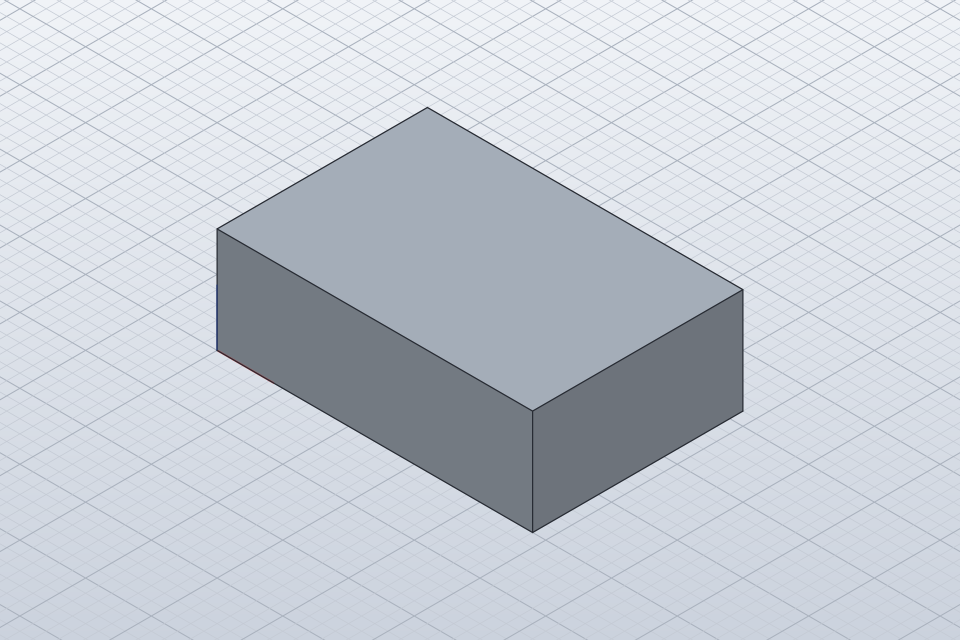
This is the actual output of our test, rendered with SOLIDCRAFT_GPU=cpu in an isolated environment. The tool warned that this CPU path omits surface-analysis colors, highlights and legends. The image verifies the generated view; it is not a screenshot of an interactive desktop session or a GPU performance comparison.
Build from source only if that is your task
The checked workspace declares Rust edition 2024 and rust-version = "1.95". Use the tagged source and its building instructions, rather than copying older commands that still use the SolveCraft name.
For example, from the repository checkout, the documented CLI entry is:
cargo run --release -p solidcraft-cli -- commands
The desktop package is named solidcraft; the CLI package is solidcraft-cli. Building requires the matching Rust toolchain and platform dependencies. We used the prebuilt CLI and did not reproduce a source build.
The browser build uses Trunk in apps/solidcraft-web. Upstream documents WebGPU and a WebGL2 option via ?webgl. This is a browser delivery path, not proof that every desktop integration works in a tab. For an initial model check, choose one environment and keep the release and output files identifiable.
Avoid losing an editable design during an upgrade
Version 0.20.0 writes design format 31. Its release notes say 0.19.0 and earlier cannot open designs saved by 0.20.0. Keep a copy before resaving an existing project in the new version. A STEP export is useful for geometry exchange, but it is not a replacement for that older native backup.
If solidcraft-cli is not found, use the extracted executable's full path before reinstalling the app. If a command fails, read the reported feature error; do not add --allow-errors just to obtain an output file. For an incorrect-looking export, compare the native and STEP readbacks, their body count and dimensions, and the saved timeline. Preserve the smallest failing script and the exact CLI version for an upstream report.